Rooting an Android smartphone allows users system access to their Android device, giving capabilities to enhance, modify and customize the appearance and functions of the device.
Chainfire a popular CF-Auto-Root utility now supports Samsung’s latest Galaxy S7 and Galaxy S7 edge smartphones.
Download and install USB drivers for Samsung Galaxy S7 in your computer.
Go to Settings > tap for about five times to enable Developer options.
Go to the Developer Options and enable
OEM Unlock.
Enable USB debugging option by pressing Menu > Settings > Applications . Navigate and tap on Developer Options to ensure that USB Debugging is enabled.
Ensure that your Samsung Galaxy S7 carries more than 70% of charge.
Required files: download Odin for installation from here ; also download Chainfire root tool for Exynos Samsung Galaxy S7 from this link (for SM-G930F – or search a file appropriate for your own device’s model).
Here are the steps to root Galaxy S7 on Android 6.0.1 Marshmallow:
Unzip Odin on your computer and install it on your PC.
Unzip Chainfire zip file and retrieve . tar.md5 file on your computer.
Switch your phone off and enter into download mode: press and hold Volume Down + Home buttons simultaneously and then press the Power key till you see the construction Android robot sign. Press Power key again to confirm.
Open ODIN on your computer and connect your Samsung Galaxy S7 with your PC while it’s in Download mode. When connected successfully, you will get a message in Odin saying Added!! . (In case you don’t get it, try another USB port. If that doesn’t help either, then re-install USB drivers) .
In ODIN, click on the AP / PDA button and select the extracted CF-Auto-Root file.
Ensuring that Auto Reboot and F. Reset Time are selected, click on Start to initiate the root process.
When the root process is successfully completed, you will get a PASS message and ID:COM will turn green.
Once your device automatically reboots
and you see the home screen, you can disconnect your Samsung Galaxy S7.
Showing posts with label How to's. Show all posts
Thursday, June 2, 2016
How To Root Samsung Galaxy S7 Smartphone
Wednesday, May 11, 2016
HOW TO TWEAK IMEI FOR NONE 'MTK ' DEVICE
Using Teminal Emulator To Tweak Or Change Your IMEI
Step 1. Root your device. In case you don't know the best and safe way to root your phone, click here to see how to root almost all android phone safely
Step 2. Download Terminal emulator here
Step 3. Open the Android Terminal Emulator app that you just downloaded
Step 4.Type SU then press ENTER button to get Superuser permmison
Step 5. Now type this command then press ENTER buttonecho ‘AT+EGMR=1,7,”IMEI_NUMBER”‘ >/dev/pttycmd1 or echo AT+EGMR=1*7*IMEI_1 >/dev/pttycmd1 In Case You Use A Double/Dual Sim Phone, Use
This Steps
Step 1. Root your Android phone or tablet. See how to root here
Step 2. Download and install Android terminal emulator app here
Step 3. Open android terminal emulator that you downloaded
Step 4. Type SU then press ENTER
Step 5. Type following command then Eneter echo ‘AT+EGMR=1,7, “IMEI_NUMBER” ‘ >/dev/ pttycmd1
Step 6. If your phone is dual-sim, typ this command then ENTER echo ‘AT+EGMR=1,10, “IMEI_NUMBER” ‘ >/dev/pttycmd1
Step 7. And finally, reboot your device and enjoy.
Tuesday, September 22, 2015
How To Transfer Money from GTbank To Another Bank Without Tolken
Guaranty Trust Bank plc also known as GTBank or simply GTB allows customers to transfer money from GTBank to another bank account. You can carry out the money transfer on gtbank internet banking platform, by making use of gtbank mobile app or by dialing the gtbank *737 ShortCode.
If you want to transfer money from gtbank to non-gtbank accounts at gtbank.com website, you must have registered for gtbank online banking or for gtbank GAPS (corporate banking). You will need a gtbank token device for authorization of your money transfers. You will also need the token device for authorization whenever you want to transfer using the gtbank mobile banking app.

You won't need the token device if you want to transfer money from your gtbank account using the gtbank *737 service. You will only have to provide the last four digits of your GTBank Naira MasterCard to authenticate the transfers. More so, you will have to ensure that the phone number used for dialing the shortcode is the same phone number you have on your GTBank account profile.
How Do I Transfer Money from GTBank
Without Token?
You can transfer funds from gtbank to another bank account using your phone, without using the gtbank token device. Just follow the steps below :
==> Dial *737*2*Amount*NUBAN Account No#
from the mobile number registered with the Bank.
==> Select recipient's bank (FBN, Access, Zenith,
UBA & DBN)
==> Enter last four digits of your GTBank Naira
MasterCard.
==> Wait for the transaction to be completed.
You will receive debit alert once the transfer is
successful. That's all.
To transfer money from gtbank website or mobile app, sign in with your gtbank id and password, then go to the "Transfer funds" menu and follow the instruction.
I hope this helps.
NB: Bank charges apply.
Tuesday, September 15, 2015
How To Install Windows 10 on Your Phone
Since the very first announcement of Windows 10 by Microsoft, phone users were eager to get their hands on the latest version of Windows 10 for phones. With Windows 10, Microsoft has tried to deliver the promise of One Microsoft i.e.
same experience on all devices of varied sizes. Microsoft released the first beta version of Window 10 for the mobile phones a couple of days ago. To install Windows 10 Technical Preview on your mobile phone, first you need to check whether your mobile phone is fulfilling the eligibility criteria or not. For the time being, selected devices are supporting the Windows 10 Preview for phones.
To install windows 10 for phone, the device should be running with Windows 8.1 in it. If your phone falls under these mentioned devices, you can install Window 10 in it, otherwise you’ll have to be patient.
Your phone must be running on Windows Phone 8.1 to upgrade it to Windows 10 Preview for phones. Check this by going to Settings>Info>About.
After the confirmation, sign up for Windows Insider Program from Here. Finally, download the Windows Insider App from Windows Phone Store and install it.
Open the installed app and let it scan the specifics of your phone. It will then guide you through the upgrade process.
NOTE: It’s a good idea to have your device connected to a charger, ensuring the update is able to finish without issue. This is a very early and incomplete preview. It is recommended for you if you are willing to explore Windows 10 for phones features before anyone else. There are some known issues and workarounds available to deal with them.
Friday, August 28, 2015
How to solve major whatsapp messenger issues
WhatsApp is a standout amongst the most prominent multi-stage informing applications out there, with around 10 percent of people on the planet effectively utilizing it consistently.
Given this volume of utilization, it's unmistakable it gets a considerable measure of things right, however today we will be focusing on what it gets off-base.
On the off chance that you are encountering issues, here are a few answers for fix basic WhatsApp issues on Android.
So as to download the most recent rendition of WhatsApp, you need to have a cell phone running Android form 2.1 or higher.
You can check your telephone's present Android form in Settings > About Phone.
In case you're attempting to download the WhatsApp application from the WhatsApp site, you'll have to have 'Unknown Sources' empowered in your security settings.
Go to Settings > Security > Unknown Sources to initiate it.
Why wouldn't i be able to interface with WhatsApp?
More often than not this issue will be brought on by your Wi-Fi association or the system information association that WhatsApp is attempting to utilize.
In the event that you aren't ready to communicate something specific, here are a couple of arrangements:
Verify your telephone is exchanged on (one for the novices).
Introduce the most recent adaptation of the application from the Play Store.
Check your web association, Wi-Fi or 3G (in Settings > Wireless and Network).
Verify that a Task Killer application (an outsider application that will help spare vitality by closing down applications) isn't initiated or influencing WhatsApp.
Unfilled the application reserve (Settings > Applications > WhatsApp > Clear Cache).
At last, the most great arrangement: uninstall the application and after that reinstall it.
Why doesn't WhatsApp perceive my contacts?
There are a couple reasons why WhatsApp wouldn't perceive your contacts, so here is a straightforward check rundown to verify it does:
Verify you have your contacts are right contact numbers (the ones they use for WhatsApp).
Verify that they are presently utilizing WhatsApp.
Verify you have the most recent form of WhatsApp.
In your contact rundown, verify the majority of your contacts are "noticeable" and/or 'perceptible'.
In your contact rundown, reach bunches (companions, family, colleagues, and so forth) are situated to "obvious" and/or 'perceptible'.
How would I include global contacts in WhatsApp?
We've all been there. You're going through South America on your crevice year, and you're acquainted with that gentleman in that lodging that you know you'll need to stay in contact with until the end of time.
You get his digits, and quest for him in WhatsApp, yet he's not there...
The arrangement is straightforward: when including worldwide gets in touch with, you should dependably incorporate the right provincial code (for instance, +51 for Peru), regardless of the possibility that your present number uses the same code.
It would be ideal if the other individual does likewise for your number moreover.
How would I piece contacts in WhatsApp?
Individuals piece contacts for any number of reasons.
I'm not here to judge, and on the off chance that you end up in this position the procedure is extremely straightforward.
To piece a contact, you should do nothing more than go to the discussion of the contact you wish to square, tap the choices catch (the three spots), tap "More" and after that tap 'Square'.
You can include every one of the gets in touch with you need to this boycott and afterward you won't get any a greater amount of their messages.
On the off chance that you later choose you might want to unblock a contact, then you simply do a reversal to the same place and pick 'Unblock'.
What does 'Last Seen' mean in WhatsApp?
The 'Last Seen' time stamp just tells clients when you were last utilizing WhatsApp.
This does not so much imply that you have perused the greater part of your WhatsApp messages, just that the application was open.
When you're in WhatsApp and one of your contacts opens WhatsApp, you'll see their status change to "Online" however once more, this doesn't mean they're taking a gander at your messages, only that they have WhatsApp open.
How would I shroud my 'Last Seen' timestamp in WhatsApp?
This one is really simple. In WhatsApp, go to your Settings, then to Account, then to Privacy. In this menu, tap 'Last Seen' and you can choose Nobody from the alternatives that appear.
This implies that nobody will have the capacity to see the last time you had WhatsApp open.
You won't have the capacity to see when your contacts were last online either.
How would I pay for WhatsApp?
In spite of being allowed to download, WhatsApp does (kind of) expense cash.
When you enlist, you'll be educated that you'll need to pay subsequent to having one year for nothing.
iOS clients get WhatsApp for nothing forever, yet Android clients are requested that pay 99 pennies for each year. Still, I've been utilizing WhatsApp for a long time and have dependably had my installment conceded...
There are distinctive installment potential outcomes:
Google Wallet and sending an installment join. Some more established forms of WhatsApp still bolster PayPal as well.
The primary will give you the alternative by means of your guide to pay with your Paypal record (in the event that you have one) or with Visa.
The second relates to your Google Wallet account, for which you can subscribe for simpler application buying (you should give Google your ledger data).
The third one will send you a buy join by means of email.
What do the blue weigh imprints mean in WhatsApp?
There is a considerable measure of perplexity about what the two checks (or tick marks) in your WhatsApp message window mean.
Here is a breakdown:
The clock image implies your message is yet to be sent from your gadget.
One dim tick implies that the message has been sent and has been gotten by the WhatsApp server.
Two dim ticks implies the message has been conveyed to the planned gadget.
Two blue ticks implies that the beneficiary/beneficiaries have seen the message.
(In gathering discussions, this implies when all members in the gathering have seen the message.)
How would I prevent individuals from realizing that I've perused their messages?
As of WhatsApp adaptation 2.11.444, you can handicap the WhatsApp blue check imprints (read receipts) so clients don't know whether you have perused your messages.
Obviously, this works both ways, so just debilitate this in case you're alright with not knowing who has perused your messages either.
Go to Settings > Account > Privacy > Read Receipts.
How would I erase my WhatsApp account?
Firstly, erasing your WhatsApp record and erasing the WhatsApp application are two unique things. On the off chance that you settle on the choice to cut ties with WhatsApp, you can just uninstall if from your gadget.
You will have the capacity to download it again from the Play Store later on the off chance that you need to, however this is not the same as erasing your record.
To uninstall the WhatsApp application from your telephone:
go to Settings > Apps > WhatsApp > Uninstall.
To erase your WhatsApp account altogether:
go to WhatsApp > Menu > Settings > Account > Delete My Account and affirm your telephone number.
You additionally have the choice to change your WhatsApp number connected with your record here.
How would I cripple media auto-download in WhatsApp?
While this is a super helpful element when associated with free Wi-Fi, auto-downloading media shared by your companions is not generally the best thought in the event that you are close to your information limit.
To cripple this element, go to Settings > Chat Settings > Media Auto-Download, and arrange the alternatives to your inclination.
Note that voice messages are dependably consequently downloaded, yet their document size is typically much littler than that of pictures and features.
How would I share and send any document in WhatsApp?
WhatsApp has a generally predetermined number of document sorts you can send: photographs, features, sound, map area, contact subtle elements.
Indeed, even with those upheld record sorts WhatsApp intensely packs them.
Be that as it may, suppose it is possible that you need to send a PDF or a GIF.
The most straightforward approach to evade these constraints is to utilize an application.
One we prescribe is called CloudSend, which connections to a Dropbox record and after that makes short-interface URLs to any sort of document you need to share, in WhatsApp or somewhere else.
Essentially snatch the application, hit the offer menu for the record and pick CloudSend.
On the off chance that you have more inquiries, you can leave your solicitations in the remarks beneath and we'll upgrade this article with more answers for your WhatsApp issues.
Given this volume of utilization, it's unmistakable it gets a considerable measure of things right, however today we will be focusing on what it gets off-base.
On the off chance that you are encountering issues, here are a few answers for fix basic WhatsApp issues on Android.
So as to download the most recent rendition of WhatsApp, you need to have a cell phone running Android form 2.1 or higher.
You can check your telephone's present Android form in Settings > About Phone.
In case you're attempting to download the WhatsApp application from the WhatsApp site, you'll have to have 'Unknown Sources' empowered in your security settings.
Go to Settings > Security > Unknown Sources to initiate it.
Why wouldn't i be able to interface with WhatsApp?
More often than not this issue will be brought on by your Wi-Fi association or the system information association that WhatsApp is attempting to utilize.
In the event that you aren't ready to communicate something specific, here are a couple of arrangements:
Verify your telephone is exchanged on (one for the novices).
Introduce the most recent adaptation of the application from the Play Store.
Check your web association, Wi-Fi or 3G (in Settings > Wireless and Network).
Verify that a Task Killer application (an outsider application that will help spare vitality by closing down applications) isn't initiated or influencing WhatsApp.
Unfilled the application reserve (Settings > Applications > WhatsApp > Clear Cache).
At last, the most great arrangement: uninstall the application and after that reinstall it.
Why doesn't WhatsApp perceive my contacts?
There are a couple reasons why WhatsApp wouldn't perceive your contacts, so here is a straightforward check rundown to verify it does:
Verify you have your contacts are right contact numbers (the ones they use for WhatsApp).
Verify that they are presently utilizing WhatsApp.
Verify you have the most recent form of WhatsApp.
In your contact rundown, verify the majority of your contacts are "noticeable" and/or 'perceptible'.
In your contact rundown, reach bunches (companions, family, colleagues, and so forth) are situated to "obvious" and/or 'perceptible'.
How would I include global contacts in WhatsApp?
We've all been there. You're going through South America on your crevice year, and you're acquainted with that gentleman in that lodging that you know you'll need to stay in contact with until the end of time.
You get his digits, and quest for him in WhatsApp, yet he's not there...
The arrangement is straightforward: when including worldwide gets in touch with, you should dependably incorporate the right provincial code (for instance, +51 for Peru), regardless of the possibility that your present number uses the same code.
It would be ideal if the other individual does likewise for your number moreover.
How would I piece contacts in WhatsApp?
Individuals piece contacts for any number of reasons.
I'm not here to judge, and on the off chance that you end up in this position the procedure is extremely straightforward.
To piece a contact, you should do nothing more than go to the discussion of the contact you wish to square, tap the choices catch (the three spots), tap "More" and after that tap 'Square'.
You can include every one of the gets in touch with you need to this boycott and afterward you won't get any a greater amount of their messages.
On the off chance that you later choose you might want to unblock a contact, then you simply do a reversal to the same place and pick 'Unblock'.
What does 'Last Seen' mean in WhatsApp?
The 'Last Seen' time stamp just tells clients when you were last utilizing WhatsApp.
This does not so much imply that you have perused the greater part of your WhatsApp messages, just that the application was open.
When you're in WhatsApp and one of your contacts opens WhatsApp, you'll see their status change to "Online" however once more, this doesn't mean they're taking a gander at your messages, only that they have WhatsApp open.
How would I shroud my 'Last Seen' timestamp in WhatsApp?
This one is really simple. In WhatsApp, go to your Settings, then to Account, then to Privacy. In this menu, tap 'Last Seen' and you can choose Nobody from the alternatives that appear.
This implies that nobody will have the capacity to see the last time you had WhatsApp open.
You won't have the capacity to see when your contacts were last online either.
How would I pay for WhatsApp?
In spite of being allowed to download, WhatsApp does (kind of) expense cash.
When you enlist, you'll be educated that you'll need to pay subsequent to having one year for nothing.
iOS clients get WhatsApp for nothing forever, yet Android clients are requested that pay 99 pennies for each year. Still, I've been utilizing WhatsApp for a long time and have dependably had my installment conceded...
There are distinctive installment potential outcomes:
Google Wallet and sending an installment join. Some more established forms of WhatsApp still bolster PayPal as well.
The primary will give you the alternative by means of your guide to pay with your Paypal record (in the event that you have one) or with Visa.
The second relates to your Google Wallet account, for which you can subscribe for simpler application buying (you should give Google your ledger data).
The third one will send you a buy join by means of email.
What do the blue weigh imprints mean in WhatsApp?
There is a considerable measure of perplexity about what the two checks (or tick marks) in your WhatsApp message window mean.
Here is a breakdown:
The clock image implies your message is yet to be sent from your gadget.
One dim tick implies that the message has been sent and has been gotten by the WhatsApp server.
Two dim ticks implies the message has been conveyed to the planned gadget.
Two blue ticks implies that the beneficiary/beneficiaries have seen the message.
(In gathering discussions, this implies when all members in the gathering have seen the message.)
How would I prevent individuals from realizing that I've perused their messages?
As of WhatsApp adaptation 2.11.444, you can handicap the WhatsApp blue check imprints (read receipts) so clients don't know whether you have perused your messages.
Obviously, this works both ways, so just debilitate this in case you're alright with not knowing who has perused your messages either.
Go to Settings > Account > Privacy > Read Receipts.
How would I erase my WhatsApp account?
Firstly, erasing your WhatsApp record and erasing the WhatsApp application are two unique things. On the off chance that you settle on the choice to cut ties with WhatsApp, you can just uninstall if from your gadget.
You will have the capacity to download it again from the Play Store later on the off chance that you need to, however this is not the same as erasing your record.
To uninstall the WhatsApp application from your telephone:
go to Settings > Apps > WhatsApp > Uninstall.
To erase your WhatsApp account altogether:
go to WhatsApp > Menu > Settings > Account > Delete My Account and affirm your telephone number.
You additionally have the choice to change your WhatsApp number connected with your record here.
How would I cripple media auto-download in WhatsApp?
While this is a super helpful element when associated with free Wi-Fi, auto-downloading media shared by your companions is not generally the best thought in the event that you are close to your information limit.
To cripple this element, go to Settings > Chat Settings > Media Auto-Download, and arrange the alternatives to your inclination.
Note that voice messages are dependably consequently downloaded, yet their document size is typically much littler than that of pictures and features.
How would I share and send any document in WhatsApp?
WhatsApp has a generally predetermined number of document sorts you can send: photographs, features, sound, map area, contact subtle elements.
Indeed, even with those upheld record sorts WhatsApp intensely packs them.
Be that as it may, suppose it is possible that you need to send a PDF or a GIF.
The most straightforward approach to evade these constraints is to utilize an application.
One we prescribe is called CloudSend, which connections to a Dropbox record and after that makes short-interface URLs to any sort of document you need to share, in WhatsApp or somewhere else.
Essentially snatch the application, hit the offer menu for the record and pick CloudSend.
On the off chance that you have more inquiries, you can leave your solicitations in the remarks beneath and we'll upgrade this article with more answers for your WhatsApp issues.
How to change default Browser On Window10
Windows 10 has being round for a while now following its released on July 29, features like the Windows 10 browser, Microsot Edge which replaced the old Internet explorer as the default browser on windows 10, Start Menu, Cortana and others grace the great new Windows and make it the best Windows so ever, or what do you think about the new
windows?
Change Default Browser On Windows 10
By default, Microsoft edge is set as the default browser, you might have other web browser like Firefox, Google chrome, or Opera Installed on your computer but Edge is sets as the default browser, to now change default browser on windows 10, you have to go to settings and change it unlike before that you can simply go to your browser and set it their.
Click on the Start Menu and select settings

Now select System as shown bellow

Scroll down and click on default apps, now you can change the default browser from the right panel by clicking on the browser, this will bring list of browser you can select, as you can see in the shot below, have already change mine to Firefox and that is why it shows Firefox instead of the default Edge
browser.

Now anytime you click on a link or any activities that require a browser, it will go straight to the default browser you set. Cool, huh?
windows?
Change Default Browser On Windows 10
By default, Microsoft edge is set as the default browser, you might have other web browser like Firefox, Google chrome, or Opera Installed on your computer but Edge is sets as the default browser, to now change default browser on windows 10, you have to go to settings and change it unlike before that you can simply go to your browser and set it their.
Click on the Start Menu and select settings
Now select System as shown bellow
Scroll down and click on default apps, now you can change the default browser from the right panel by clicking on the browser, this will bring list of browser you can select, as you can see in the shot below, have already change mine to Firefox and that is why it shows Firefox instead of the default Edge
browser.
Now anytime you click on a link or any activities that require a browser, it will go straight to the default browser you set. Cool, huh?
How To Use Whatsapp Web For All IOS Users (iPhone)
WhatApp is a cross-stage texting application (versatile form) which is fit for sending instant messages, calls, feature and some more.
WhatsApp Web has been taken off at last for the clients of iPhone. After a long hold up, WhatsApp has propelled its webclient for iOS clients.
Prior, WhatsApp was at first made accessible through web programs amid the month of January 2015 just for Android, Blackberry, and Windows Phone clients, however now, it is accessible for iOS clients through which clients will have the capacity to synchronize WhatsApp with Laptops and Desktops.
WhatsApp for Web is accessible for iPhone clients, as well as it will now work with Safari on the Mac.
It has presented most recent components with this WhatApp web rendition. Here is an orderly procedure of how to set up and utilize the WhatsApp Web form for iPhone clients.
Look at it!
Basic Steps to Use WhatsApp Web on iOS
WhatsApp Web is presently accessible for the iOS clients and you must be holding up to utilize this web form.
You must be extremely eager to get this web form on your desktop or portable PCs. Thus, we arrive with basic strides to check WhatsApp web on your iPhone furthermore check whether you can get to all the most recent elements of WhatsApp web on your iPhone.
At first, open WhatApp on your iPhone.
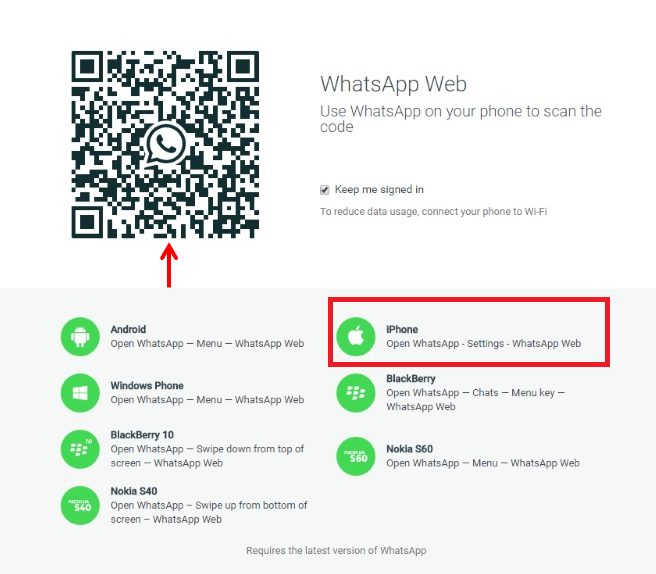
Click on Settings and if there is WhatsApp Web alternative in Settings, then you will have the capacity to actuate the web form on your iPhone.
On the off chance that you have that alternative on your iPhone, now you have to visit the site from your PC's Google Chrome program where WhatsApp Web is accessible.
A QR code will appear on the screen of your PC. Presently, the application must dispatch a QR code scanner that gives you approach to begin filtering.
Simply point your telephone's camera towards the QR code on your PC screen.
Simply examine the QR code showed on WhatsApp web utilizing your Phone camera so you will be consequently signed into WhatsApp on the web.
You have now effectively matched WhatsApp on your iphone with the WhatsApp web customer.
That is all and you are finished!
Note: If you confront any issue (like WhatsApp web choice not display in the Settings), then verify that you've introduced the most recent form of WhatsApp on your telephone.

Components of WhatsApp Web
WhatsApp web is at present accessible for the iPhone clients.
By utilizing WhatsApp on web, there are a few advantages. Here are a few components of WhatsApp web interface that gives you a chance to do taking after things.
You can quiet an individual talk and imprint a discussion as read or new.
You can undoubtedly reinforcement features and area sharing.
The web variant permit auto stacking of more established messages alongside better backing for VoiceOver.
WhatsApp web interface gives more control over visits and gathering discussions.
You can alter profile photographs and status message.
At whatever point settings showcase flood for talks, the client can decide to erase and file visits.
It likewise permit clients to file, quiet and way out gathering talks.
This is the most simplest approach to set up and WhatsApp web on your iPhone with the goal that you can specifically synchronize your records and talks to WhatsApp Web.
Trust this aide helps you interface your web program to the new form of WhatsApp web on your iPhone.
WhatsApp Web has been taken off at last for the clients of iPhone. After a long hold up, WhatsApp has propelled its webclient for iOS clients.
Prior, WhatsApp was at first made accessible through web programs amid the month of January 2015 just for Android, Blackberry, and Windows Phone clients, however now, it is accessible for iOS clients through which clients will have the capacity to synchronize WhatsApp with Laptops and Desktops.
WhatsApp for Web is accessible for iPhone clients, as well as it will now work with Safari on the Mac.
It has presented most recent components with this WhatApp web rendition. Here is an orderly procedure of how to set up and utilize the WhatsApp Web form for iPhone clients.
Look at it!
Basic Steps to Use WhatsApp Web on iOS
WhatsApp Web is presently accessible for the iOS clients and you must be holding up to utilize this web form.
You must be extremely eager to get this web form on your desktop or portable PCs. Thus, we arrive with basic strides to check WhatsApp web on your iPhone furthermore check whether you can get to all the most recent elements of WhatsApp web on your iPhone.
At first, open WhatApp on your iPhone.
Click on Settings and if there is WhatsApp Web alternative in Settings, then you will have the capacity to actuate the web form on your iPhone.
On the off chance that you have that alternative on your iPhone, now you have to visit the site from your PC's Google Chrome program where WhatsApp Web is accessible.
A QR code will appear on the screen of your PC. Presently, the application must dispatch a QR code scanner that gives you approach to begin filtering.
Simply point your telephone's camera towards the QR code on your PC screen.
Simply examine the QR code showed on WhatsApp web utilizing your Phone camera so you will be consequently signed into WhatsApp on the web.
You have now effectively matched WhatsApp on your iphone with the WhatsApp web customer.
That is all and you are finished!
Note: If you confront any issue (like WhatsApp web choice not display in the Settings), then verify that you've introduced the most recent form of WhatsApp on your telephone.

Components of WhatsApp Web
WhatsApp web is at present accessible for the iPhone clients.
By utilizing WhatsApp on web, there are a few advantages. Here are a few components of WhatsApp web interface that gives you a chance to do taking after things.
You can quiet an individual talk and imprint a discussion as read or new.
You can undoubtedly reinforcement features and area sharing.
The web variant permit auto stacking of more established messages alongside better backing for VoiceOver.
WhatsApp web interface gives more control over visits and gathering discussions.
You can alter profile photographs and status message.
At whatever point settings showcase flood for talks, the client can decide to erase and file visits.
It likewise permit clients to file, quiet and way out gathering talks.
This is the most simplest approach to set up and WhatsApp web on your iPhone with the goal that you can specifically synchronize your records and talks to WhatsApp Web.
Trust this aide helps you interface your web program to the new form of WhatsApp web on your iPhone.
Sunday, August 23, 2015
How to solve major whatsapp messenger issues
WhatsApp is a standout amongst the most prominent multi-stage informing applications out there, with around 10 percent of people on the planet effectively utilizing it consistently.
Given this volume of utilization, it's unmistakable it gets a considerable measure of things right, however today we will be focusing on what it gets off-base.
On the off chance that you are encountering issues, here are a few answers for fix basic WhatsApp issues on Android.
So as to download the most recent rendition of WhatsApp, you need to have a cell phone running Android form 2.1 or higher.
You can check your telephone's present Android form in Settings > About Phone.
In case you're attempting to download the WhatsApp application from the WhatsApp site, you'll have to have 'Unknown Sources' empowered in your security settings.
Go to Settings > Security > Unknown Sources to initiate it.
Why wouldn't i be able to interface with WhatsApp?
More often than not this issue will be brought on by your Wi-Fi association or the system information association that WhatsApp is attempting to utilize.
In the event that you aren't ready to communicate something specific, here are a couple of arrangements:
Verify your telephone is exchanged on (one for the novices).
Introduce the most recent adaptation of the application from the Play Store.
Check your web association, Wi-Fi or 3G (in Settings > Wireless and Network).
Verify that a Task Killer application (an outsider application that will help spare vitality by closing down applications) isn't initiated or influencing WhatsApp.
Unfilled the application reserve (Settings > Applications > WhatsApp > Clear Cache).
At last, the most great arrangement: uninstall the application and after that reinstall it.
Why doesn't WhatsApp perceive my contacts?
There are a couple reasons why WhatsApp wouldn't perceive your contacts, so here is a straightforward check rundown to verify it does:
Verify you have your contacts are right contact numbers (the ones they use for WhatsApp).
Verify that they are presently utilizing WhatsApp.
Verify you have the most recent form of WhatsApp.
In your contact rundown, verify the majority of your contacts are "noticeable" and/or 'perceptible'.
In your contact rundown, reach bunches (companions, family, colleagues, and so forth) are situated to "obvious" and/or 'perceptible'.
How would I include global contacts in WhatsApp?
We've all been there. You're going through South America on your crevice year, and you're acquainted with that gentleman in that lodging that you know you'll need to stay in contact with until the end of time.
You get his digits, and quest for him in WhatsApp, yet he's not there...
The arrangement is straightforward: when including worldwide gets in touch with, you should dependably incorporate the right provincial code (for instance, +51 for Peru), regardless of the possibility that your present number uses the same code.
It would be ideal if the other individual does likewise for your number moreover.
How would I piece contacts in WhatsApp?
Individuals piece contacts for any number of reasons.
I'm not here to judge, and on the off chance that you end up in this position the procedure is extremely straightforward.
To piece a contact, you should do nothing more than go to the discussion of the contact you wish to square, tap the choices catch (the three spots), tap "More" and after that tap 'Square'.
You can include every one of the gets in touch with you need to this boycott and afterward you won't get any a greater amount of their messages.
On the off chance that you later choose you might want to unblock a contact, then you simply do a reversal to the same place and pick 'Unblock'.
What does 'Last Seen' mean in WhatsApp?
The 'Last Seen' time stamp just tells clients when you were last utilizing WhatsApp.
This does not so much imply that you have perused the greater part of your WhatsApp messages, just that the application was open.
When you're in WhatsApp and one of your contacts opens WhatsApp, you'll see their status change to "Online" however once more, this doesn't mean they're taking a gander at your messages, only that they have WhatsApp open.
How would I shroud my 'Last Seen' timestamp in WhatsApp?
This one is really simple. In WhatsApp, go to your Settings, then to Account, then to Privacy. In this menu, tap 'Last Seen' and you can choose Nobody from the alternatives that appear.
This implies that nobody will have the capacity to see the last time you had WhatsApp open.
You won't have the capacity to see when your contacts were last online either.
How would I pay for WhatsApp?
In spite of being allowed to download, WhatsApp does (kind of) expense cash.
When you enlist, you'll be educated that you'll need to pay subsequent to having one year for nothing.
iOS clients get WhatsApp for nothing forever, yet Android clients are requested that pay 99 pennies for each year. Still, I've been utilizing WhatsApp for a long time and have dependably had my installment conceded...
There are distinctive installment potential outcomes:
Google Wallet and sending an installment join. Some more established forms of WhatsApp still bolster PayPal as well.
The primary will give you the alternative by means of your guide to pay with your Paypal record (in the event that you have one) or with Visa.
The second relates to your Google Wallet account, for which you can subscribe for simpler application buying (you should give Google your ledger data).
The third one will send you a buy join by means of email.
What do the blue weigh imprints mean in WhatsApp?
There is a considerable measure of perplexity about what the two checks (or tick marks) in your WhatsApp message window mean.
Here is a breakdown:
The clock image implies your message is yet to be sent from your gadget.
One dim tick implies that the message has been sent and has been gotten by the WhatsApp server.
Two dim ticks implies the message has been conveyed to the planned gadget.
Two blue ticks implies that the beneficiary/beneficiaries have seen the message.
(In gathering discussions, this implies when all members in the gathering have seen the message.)
How would I prevent individuals from realizing that I've perused their messages?
As of WhatsApp adaptation 2.11.444, you can handicap the WhatsApp blue check imprints (read receipts) so clients don't know whether you have perused your messages.
Obviously, this works both ways, so just debilitate this in case you're alright with not knowing who has perused your messages either.
Go to Settings > Account > Privacy > Read Receipts.
How would I erase my WhatsApp account?
Firstly, erasing your WhatsApp record and erasing the WhatsApp application are two unique things. On the off chance that you settle on the choice to cut ties with WhatsApp, you can just uninstall if from your gadget.
You will have the capacity to download it again from the Play Store later on the off chance that you need to, however this is not the same as erasing your record.
To uninstall the WhatsApp application from your telephone:
go to Settings > Apps > WhatsApp > Uninstall.
To erase your WhatsApp account altogether:
go to WhatsApp > Menu > Settings > Account > Delete My Account and affirm your telephone number.
You additionally have the choice to change your WhatsApp number connected with your record here.
How would I cripple media auto-download in WhatsApp?
While this is a super helpful element when associated with free Wi-Fi, auto-downloading media shared by your companions is not generally the best thought in the event that you are close to your information limit.
To cripple this element, go to Settings > Chat Settings > Media Auto-Download, and arrange the alternatives to your inclination.
Note that voice messages are dependably consequently downloaded, yet their document size is typically much littler than that of pictures and features.
How would I share and send any document in WhatsApp?
WhatsApp has a generally predetermined number of document sorts you can send: photographs, features, sound, map area, contact subtle elements.
Indeed, even with those upheld record sorts WhatsApp intensely packs them.
Be that as it may, suppose it is possible that you need to send a PDF or a GIF.
The most straightforward approach to evade these constraints is to utilize an application.
One we prescribe is called CloudSend, which connections to a Dropbox record and after that makes short-interface URLs to any sort of document you need to share, in WhatsApp or somewhere else.
Essentially snatch the application, hit the offer menu for the record and pick CloudSend.
On the off chance that you have more inquiries, you can leave your solicitations in the remarks beneath and we'll upgrade this article with more answers for your WhatsApp issues.
Given this volume of utilization, it's unmistakable it gets a considerable measure of things right, however today we will be focusing on what it gets off-base.
On the off chance that you are encountering issues, here are a few answers for fix basic WhatsApp issues on Android.
So as to download the most recent rendition of WhatsApp, you need to have a cell phone running Android form 2.1 or higher.
You can check your telephone's present Android form in Settings > About Phone.
In case you're attempting to download the WhatsApp application from the WhatsApp site, you'll have to have 'Unknown Sources' empowered in your security settings.
Go to Settings > Security > Unknown Sources to initiate it.
Why wouldn't i be able to interface with WhatsApp?
More often than not this issue will be brought on by your Wi-Fi association or the system information association that WhatsApp is attempting to utilize.
In the event that you aren't ready to communicate something specific, here are a couple of arrangements:
Verify your telephone is exchanged on (one for the novices).
Introduce the most recent adaptation of the application from the Play Store.
Check your web association, Wi-Fi or 3G (in Settings > Wireless and Network).
Verify that a Task Killer application (an outsider application that will help spare vitality by closing down applications) isn't initiated or influencing WhatsApp.
Unfilled the application reserve (Settings > Applications > WhatsApp > Clear Cache).
At last, the most great arrangement: uninstall the application and after that reinstall it.
Why doesn't WhatsApp perceive my contacts?
There are a couple reasons why WhatsApp wouldn't perceive your contacts, so here is a straightforward check rundown to verify it does:
Verify you have your contacts are right contact numbers (the ones they use for WhatsApp).
Verify that they are presently utilizing WhatsApp.
Verify you have the most recent form of WhatsApp.
In your contact rundown, verify the majority of your contacts are "noticeable" and/or 'perceptible'.
In your contact rundown, reach bunches (companions, family, colleagues, and so forth) are situated to "obvious" and/or 'perceptible'.
How would I include global contacts in WhatsApp?
We've all been there. You're going through South America on your crevice year, and you're acquainted with that gentleman in that lodging that you know you'll need to stay in contact with until the end of time.
You get his digits, and quest for him in WhatsApp, yet he's not there...
The arrangement is straightforward: when including worldwide gets in touch with, you should dependably incorporate the right provincial code (for instance, +51 for Peru), regardless of the possibility that your present number uses the same code.
It would be ideal if the other individual does likewise for your number moreover.
How would I piece contacts in WhatsApp?
Individuals piece contacts for any number of reasons.
I'm not here to judge, and on the off chance that you end up in this position the procedure is extremely straightforward.
To piece a contact, you should do nothing more than go to the discussion of the contact you wish to square, tap the choices catch (the three spots), tap "More" and after that tap 'Square'.
You can include every one of the gets in touch with you need to this boycott and afterward you won't get any a greater amount of their messages.
On the off chance that you later choose you might want to unblock a contact, then you simply do a reversal to the same place and pick 'Unblock'.
What does 'Last Seen' mean in WhatsApp?
The 'Last Seen' time stamp just tells clients when you were last utilizing WhatsApp.
This does not so much imply that you have perused the greater part of your WhatsApp messages, just that the application was open.
When you're in WhatsApp and one of your contacts opens WhatsApp, you'll see their status change to "Online" however once more, this doesn't mean they're taking a gander at your messages, only that they have WhatsApp open.
How would I shroud my 'Last Seen' timestamp in WhatsApp?
This one is really simple. In WhatsApp, go to your Settings, then to Account, then to Privacy. In this menu, tap 'Last Seen' and you can choose Nobody from the alternatives that appear.
This implies that nobody will have the capacity to see the last time you had WhatsApp open.
You won't have the capacity to see when your contacts were last online either.
How would I pay for WhatsApp?
In spite of being allowed to download, WhatsApp does (kind of) expense cash.
When you enlist, you'll be educated that you'll need to pay subsequent to having one year for nothing.
iOS clients get WhatsApp for nothing forever, yet Android clients are requested that pay 99 pennies for each year. Still, I've been utilizing WhatsApp for a long time and have dependably had my installment conceded...
There are distinctive installment potential outcomes:
Google Wallet and sending an installment join. Some more established forms of WhatsApp still bolster PayPal as well.
The primary will give you the alternative by means of your guide to pay with your Paypal record (in the event that you have one) or with Visa.
The second relates to your Google Wallet account, for which you can subscribe for simpler application buying (you should give Google your ledger data).
The third one will send you a buy join by means of email.
What do the blue weigh imprints mean in WhatsApp?
There is a considerable measure of perplexity about what the two checks (or tick marks) in your WhatsApp message window mean.
Here is a breakdown:
The clock image implies your message is yet to be sent from your gadget.
One dim tick implies that the message has been sent and has been gotten by the WhatsApp server.
Two dim ticks implies the message has been conveyed to the planned gadget.
Two blue ticks implies that the beneficiary/beneficiaries have seen the message.
(In gathering discussions, this implies when all members in the gathering have seen the message.)
How would I prevent individuals from realizing that I've perused their messages?
As of WhatsApp adaptation 2.11.444, you can handicap the WhatsApp blue check imprints (read receipts) so clients don't know whether you have perused your messages.
Obviously, this works both ways, so just debilitate this in case you're alright with not knowing who has perused your messages either.
Go to Settings > Account > Privacy > Read Receipts.
How would I erase my WhatsApp account?
Firstly, erasing your WhatsApp record and erasing the WhatsApp application are two unique things. On the off chance that you settle on the choice to cut ties with WhatsApp, you can just uninstall if from your gadget.
You will have the capacity to download it again from the Play Store later on the off chance that you need to, however this is not the same as erasing your record.
To uninstall the WhatsApp application from your telephone:
go to Settings > Apps > WhatsApp > Uninstall.
To erase your WhatsApp account altogether:
go to WhatsApp > Menu > Settings > Account > Delete My Account and affirm your telephone number.
You additionally have the choice to change your WhatsApp number connected with your record here.
How would I cripple media auto-download in WhatsApp?
While this is a super helpful element when associated with free Wi-Fi, auto-downloading media shared by your companions is not generally the best thought in the event that you are close to your information limit.
To cripple this element, go to Settings > Chat Settings > Media Auto-Download, and arrange the alternatives to your inclination.
Note that voice messages are dependably consequently downloaded, yet their document size is typically much littler than that of pictures and features.
How would I share and send any document in WhatsApp?
WhatsApp has a generally predetermined number of document sorts you can send: photographs, features, sound, map area, contact subtle elements.
Indeed, even with those upheld record sorts WhatsApp intensely packs them.
Be that as it may, suppose it is possible that you need to send a PDF or a GIF.
The most straightforward approach to evade these constraints is to utilize an application.
One we prescribe is called CloudSend, which connections to a Dropbox record and after that makes short-interface URLs to any sort of document you need to share, in WhatsApp or somewhere else.
Essentially snatch the application, hit the offer menu for the record and pick CloudSend.
On the off chance that you have more inquiries, you can leave your solicitations in the remarks beneath and we'll upgrade this article with more answers for your WhatsApp issues.

Tuesday, August 18, 2015
How to Make Money with a vogpay Donate Button

Have you ever seen one of those “buy me a beer” buttons that allow you to donate to the blogger? They used to be on every of my blog.
In fact, I know a few bloggers who would rake in four figures a year just from their donate button. Pretty amazing right?
So where did these buttons go? Why aren’t we
all using them?
How did the donate button work
The donate button was a pretty simple invention. Using
voguepay donate button, you could add a snippet of code to the sidebar of your blog and take money from generous people.
Most of the time the blogger would add the catchy “Buy Me a Beer” phrase to the top of the button to make it seem more casual and friendly.
Other times people would have a little bit of text
explaining how the money would be used; server costs, time writing more posts, etc.

If you have a
voguepay account, creating a donation button is straightforward.
First you need to access the voguepay Donations web page to get a code, and that is explicitly linked to your bank account.
Once you get the code (you can actually customize the look of the button that the code will display), simply place it on your site (wherever you want the button to appear).
What If I Have No Website or Blog?
Yes, you can also accept payment it doesn't matter you have a website, voguepay has made it easy for you to accept payment from any where all you need is to :
1. Register here on VoguePay and login.
2. Go to VoguePay > My Account and click
Generate Email Invoicing.
3. Fill the invoice form and submit. The recipient will receive an email invoice that can be used to pay directly in to your VoguePay wallet.
Didn't have voguepay account click here to create one and also you can click here to make a donation for us.
Monday, August 10, 2015
How to Start Web Design Business at Home
If you know how to create any website such as free website,education website, web hosting website, university website, eCommerce website, business website, official website, company website, forums, blogs etc and you don't know how to get customers/client online then, this short post is for you.
If you are into web designing and can easily design for people or company within the shortest period with good and quality design, template, domain name and hosting, the best way to attract more people to order for your web design services and make more money is to do the following;
1. Create a Nice Website: As a web designer or web master who wants to make money at home through the internet, you need to create a website where you post or list samples of website and design you done previously and some of your latest work. Drive traffic to the site and interested people can ask for a design from you.
2. Advertise on Facebook: You can make more money from webdesign at home simply by investing few dollars on Facebook adverts. Just create a Facebook page or boost your post on Facebook to attract more traffic to your page link or website link for promotion purposes.
- Read Also:- - How to Sell a Domain Name Quickly with ease
I will redesign your website @ $5. If truely you can get this done within the shortest period, then i assure you that orders will come.
- Read Also:- - FREE-EBOOK: 178 Hot
Selling Fiverr Gigs
4. Post on Popular Forum & : You can also get more customers for web design if you are active on popular forums or blogwhere you solve. people's problems relating to web design , this can make people see your web design signature and make contact you for a web design job and income are generated.
5. Buy Ads Space: You can also earn more money from web design while you stay at home by buying advert space on popular blog or website which in return drives traffic to your web design official website. The is one of the smartest way of getting online traffic
Other methods includes making posters, bill boards, Google Adwords, stickers and many more. Just read and think about the ideas posted above and give it a try. You too can make money from web designing from home.
Sunday, August 9, 2015
How to Sell a Domain Name Quickly with ease
How Can i Sell a Domain Quickly Online? This was the question i have seen on many online forums or on different Facebook group where people want to know the guide or tips on how to sell a domain very quickly.
To sell a domain and selling a domain name quickly seems similar but they are different. Many people buy or register a domain to sell in the future at high price like million of dollars but these dream may not come to pass but works very well for those who knows and understand the domain business and how to earn money from it.
Some of the things that attract a buyer for your domain name or how you can quickly sell your domain as fast as possible includes;
1. Buy Expired Domains: One way to sell your domain fast and quick is to always try to register or buy an expired domain name instead of registering a new domain. One fact some people do not realize about domain business is that Expired domains are established and listed on search engines with good amount of traffic which make the price high but if you can sacrifice such cash on an expired domain, then it worth the investment.
2. List at Cheap Price : Even in other business, reduced price attract more demand where you enjoy the return on turnover. If you are to sell a domain, then auction it for a cheap and affordable price on an auction never ask too much in the beginning but when the see the high rate of demand of the domain, then you increase the price for the highest bidder. Its one of the quickest way to sell something online especially domain names or a real website itself.
- Read Also:- How to Protect Your Domain Name or Lose it
3.List & Sell domain and website together: If you are giving out your domain name along with the website at a particular price, then people will rush it. It means they no longer have to worry about the website anymore. When a see a domain coming along a good and well design site then, i buy such as quickly as possible before someone else buy it.
4. Make it Short: Domain name with longer word usually do not attract site owners or individuals but when the domain name is short with a .com or .edu, org, .ng etc then it is always a good market that sells fast. So, if you have a thought of selling your domain name in future and as fast as possible, then register domain names that are short in words and pronunciation. Its a magic that sell domains quickly.
5. Payment Method: One of the things you need to put into consideration to sell your domains as quickly as possible is to includes easy and fast payment method like the normal Credit Card, Debit Card or Verified VISA or MASTERCARD but not online payment method like PayPal because not everyone uses PayPal due to restriction in some countries.
- Read Also:- - How to Accept Payments On Your Website in Nigeria
These are the things, tips and ideas you need to put into consideration that helps you sell your domain fast, quickly or any other word you can use for it.
How to Protect Your Domain Name or Lose it
Someone came to me and explaining if could help
him recover his site domain that was lost to someone else because that his one side of his business that was lost. He waited few days after expiration of his domain and someone else parked the domain which became an issue.
Do not forget the fact that your domain name is an important aspect of your business/brand and to lose such an important aspect could be too risky. But still, people lose their domain name due to carelessness because they forget to renew their site domain before expiry and some do not keep their domain contact information in a safe place, booklet or notepad.
One of the ways to lose a domain name is to ignore or fail to renew an expired domain name forgetting that there are people who will grab this opportunity grab when surfing the internet for expired domains.
Some people may even demand huge ransom to get your domain name back which is usually a difficult decision to take.
How to Protect Your Domain Names
1. To protect your domain name, just Activate the 'Domain Lock' feature with your registrar which is
usually for a few cents. This will help you secure the domain by preventing suspicious attack on site, contact info, DNS servers and other act to steal the domains.
2. Another safe way to Keep protect your domain name is to write your contact information, email address, password in a paper or diary.Its one of the safest ways to remember password and other registration of domain info.
3. One way to protect and keep your domain names is to take note of important notification from the registrar just to be sure your you don not fall for pushing mails from fake domain registrars.
4. To keep your domains safe, take seriously occasional Whois Confirmation emails sent by domain registrars to domain owners which gives them a high level of security to correct old and outdated information.
5. The best way to protect a domain name is to cultivate the habit of renewing before expiry date.
If you leave your domains for few days after expiry, you do not know who is after the domain name and you get stuck. Be protective about your domains by checking the renewal status regularly.
6. Popular ways to secure a domain name is to check other features on the domain when it comes to security. It can cost you few dollars or cent but at times, it worth it.
Since securing your domain name, website is synonymous to securing your business, then use the ideas above to keep your domain name safe.
How to Accept Payments On Your Website in Nigeria

I was building a site for an organization and i was given an instruction that the site must be responsive and also accept payments from any one buying from the site. I make some research which am posting the facts as you read on.
There are two ways to accept payments on your site as a Nigerian in Nigeria. It does not matter if your site is on joomla, dreamwaver, html or free site like wordpress or blogger. As far the site is own by a Nigerian and want to start collecting payments on the site, the two ways to do that includes;
1. Paid Ways
2. Free ways
1. Paid Ways : This is very reliable and a trusted way to accept payment with one's website in
Nigeria. You only need to get the website well designed and register with quickteller or interswitch to get a licence which allows people to pay directly to your bank account using their Atms card (debit card) of any bank. After registering, get the code and paste on the website and that is it.
2. Free ways: This is cheap and can also be used to accept payment from a website in Nigeria, the only way to do that is to partner with voguepay which helps you do that by integrating their payment button on your website. And people can pay with their debit cards on your site.
Register on Voguepay here and login
Go to VoguePay home page and click Buy now buttons Fill and submit the "CREATE BUY NOW BUTTON" form.
Copy the code shown on the right hand side of the page and paste it on your website's html code. Paste it exactly where you want a "Buy Now" button to be shown. Your customers can now click the button and pay online.
I have tried using the free method and the paid
one to accept payment on my websites, they are
wonderful and works perfectly. Just in case you need more information how to integrate the payment button on Voguepay, just visit voguepay and read through their terms and conditions.
Friday, August 7, 2015
How To crash Your Friend Whatsapp With Just A Single Message #See how
WhatsApp messenger app these days is becoming very popular. It changed the meaning of messages by taking place of SMS. Recently Facebook owned the WhatsApp and introduced blue tick mark for seen messages and it is enough for some friends to be dangerous for relationship and after that today i am providing you an awesome trick to crash your friend’s WhatsApp (Just for fun). Abeg no do am For me oooo
The trick is really very interesting and can be a painful for your friend as his/her WhatsApp will crash by just receiving your single message.
Note: Don’t use this trick with your friends for whom
conversation is very important. Because, to whom you send the tricky message (provided below post) his/her WhatsApp will be crashed and the only solution left for him will be just to clear all conversation.
I am using this trick with my friends and making some of them fool by saying ” That was virus and i am reading all your messages” and they are taking it serious as they are unable to send or receive message due to crash in WhatsApp. You can also make your friends fool by saying different messages. So without taking your more time let’s come to post.
How to crash your Friend’s WhatsApp
As I have mentioned above, all you have to do is just send a tricky coded message to your friend whom WhatsApp you want to crash.
ߘ㠊ߘ㊠ ߘ㊠ ߘ㊠ ߘ㊠ ߘ㊰ߘ㊰ߘ㊠ ߘ㊠ ߘ㊠
ߘ㊠ ߘ㊠ ߘ㊠ ߘ㊰ߘ㊰ߘ㊠ ߘ㊠ ߘ㠊ߘ㊠ ߘ㊠ ߘ㊠ ߘ㊠ ߘ
㊰ߘ㊰ߘ㊠ ߘ㊠ ߘ㠊ߘ㊠ ߘ㊠ ߘ㊠ ߘ㊠ ߘ㊰ߘ㊰ߘ㊠ ߘ㊠ ߘ
㠊ߘ㊠ ߘ㊠ ߘ㊠ ߘ㊠ ߘ㊰ߘ㊰ߘ㊠ ߘ㊠ ߘ㠊ߘ㊠ ߘ㊠ ߘ㊠
ߘ㊠ ߘ㊰ߘ㊰ߘ㊠ ߘ㊠ ߘ㠊ߘ㊠ ߘ㊠ ߘ㊠ ߘ㊠ ߘ㊰ߘ㊰ߘ㊠
ߘ㊠ ߘ㠊ߘ㊠ ߘ㊠ ߘ㊠ ߘ㊠ ߘ㊰ߘ㊰ߘ㊠ ߘ㊠ ߘ㠊ߘ㊠ ߘ
㊠ ߘ㊠ ߘ㊠ ߘ㊰ߘ㊰ߘ㊠ ߘ㊠ ߘ㠊ߘ㊠ ߘ㊠ ߘ㊠ ߘ㊠ ߘ㊰
ߘ㊰ߘ㊠ ߘ㊠ ߘ㠊ߘ㊠ ߘ㊠ ߘ㊠ ߘ㊠ ߘ㊰ߘ㊰ߘ㊠ ߘ㊠ ߘ㠊
ߘ㊠ ߘ㊠ ߘ㊠ ߘ㊠ ߘ㊰ߘ㊰ߘ㊠ ߘ㊠ ߘ㠊ߘ㊠ ߘ㊠ ߘ㊠ ߘ
㊠ ߘ㊰ߘ㊰ߘ㊠ ߘ㊠ ߘ㠊ߘ㊠ ߘ㊠ ߘ㊠ ߘ㊠ ߘ㊰ߘ㊰ߘ㊠ ߘ
㊠ ߘ㠊ߘ㊠ ߘ㊠ ߘ㊠ ߘ㊠ ߘ㊰ߘ㊰ߘ㊠ ߘ㊠ ߘ㠊ߘ㊠ ߘ㊠
ߘ㊠ ߘ㊠ ߘ㊰ߘ㊰ߘ㊠ ߘ㊠ ߘ㠊ߘ㊠ ߘ㊠ ߘ㊠ ߘ㊠ ߘ㊰ߘ㊰
ߘ㊠ ߘ㊠ ߘ㠊ߘ㊠ ߘ㊠ ߘ㊠ ߘ㊠ ߘ㊰ߘ㊰ߘ㊠ ߘ㊠ ߘ㠊ߘ
㊠ ߘ㊠ ߘ㊠ ߘ㊠ ߘ㊰ߘ㊰ߘ㊠ ߘ㊠ ߘ㠊ߘ㊠ ߘ㊠ ߘ㊠ ߘ
㊠ ߘ㊰ߘ㊰ߘ㊠ ߘ㊠ ߘ㠊ߘ㊠ ߘ㊠ ߘ㊠ ߘ㊠ ߘ㊰ߘ㊰ߘ㊠ ߘ
㊠ ߘ㠊ߘ㊠ ߘ㊠ ߘ㊠ ߘ㊠ ߘ㊰ߘ㊰ߘ㊠ ߘ㊠ ߘ㠊ߘ㊠ ߘ㊠
ߘ㊠ ߘ㊠ ߘ㊰ߘ㊰ߘ㊠ ߘ㊠ ߘ㠊ߘ㊠ ߘ㊠ ߘ㊠ ߘ㊠ ߘ㊰ߘ㊰
ߘ㊠ ߘ㊠ ߘ㠊ߘ㊠ ߘ㊠ ߘ㊠ ߘ㊠ ߘ㊰ߘ㊰ߘ㊠ ߘ㊠ ߘ㠊ߘ
㊠ ߘ㊠ ߘ㊠ ߘ㊠ ߘ㊰ߘ㊰ߘ㊠ ߘ㊠ ߘ㠊ߘ㊠ ߘ㊠ ߘ㊠ ߘ
㊠ ߘ㊰ߘ㊰ߘ㊠ ߘ㊠ ߘ㠊ߘ㊠ ߘ㊠ ߘ㊠ ߘ㊠ ߘ㊰ߘ㊰ߘ㊠ ߘ
㊠ ߘ㠊ߘ㊠ ߘ㊠ ߘ㊠ ߘ㊠ ߘ㊰ߘ㊰ߘ㊠ ߘ㊠ ߘ㠊ߘ㊠ ߘ㊠
ߘ㊠ ߘ㊠ ߘ㊰ߘ㊰ߘ㊠ ߘ㊠ ߘ㠊ߘ㊠ ߘ㊠ ߘ㊠ ߘ㊠ ߘ㊰ߘ㰟
Ѝ
ߘ㊠ ߘ㊠ ߘ㠊ߘ㊠ ߘ㊠ ߘ㊠ ߘ㊠ ߘ㊰ߘ㊰ߘ㊠ ߘ㊠ ߘ㠊ߘ
㊠ ߘ㊠ ߘ㊠ ߘ㊠ ߘ㊰ߘ㊰ߘ㊠ ߘ㊠ ߘ㠊ߘ㊠ ߘ㊠ ߘ㊠ ߘ
㊠ ߘ㊰ߘ㊰ߘ㊠ ߘ㊠ ߘ㠊ߘ㊠ ߘ㊠ ߘ㊠ ߘ㊠ ߘ㊰ߘ㊰ߘ㊠ ߘ
㊠ ߘ㠊ߘ㊠ ߘ㊠ ߘ㊠ ߘ㊠ ߘ㊰ߘ㊰ߘ㊠ ߘ㊠ ߘ㠊ߘ㊠ ߘ㊠ߘ㊠ ߘ㊠ ߘ㊰ߘ㊰ߘ㊠ ߘ㊠ ߘ㠊ߘ㊠ ߘ㊠ ߘ㊠ ߘ㊠ ߘ㊰ߘ㊰ ㊠ ߘ㠊
How to recover from this crash
You have sent message to your friend, His/Her WhatsApp is crashed. Now its time to make him/her recover from it and to do so tell them to clear all WhatApp conversation and their WhatApp will be fine, Simple..
So, let us know in comment your friends reaction after receiving your message..
Thursday, August 6, 2015
How To Hide Any Folder Or Files In Android Without Any Third Party
Today I'm gonna discuss the easiest way to hide folders or files in android. You may need to hide folders because of your nasty cousin or because of ultra-personal stuffs (you know what I mean). And the best part about the process is that you don't need any third party app. Sounds interesting, no? So
alright let the mission begin.
Stuffs You're Gonna Need:
1. A working android device.
2. A File Manager (default).
3. Few fingers to work with.
4. A Goat (optional).
First of all switch on your phone and unlock it (just kidding). Now open your file manager. For this tutorial, I'm using the default file manager of my Galaxy tab (don't laugh, old is gold).
Next go to your file manager settings and look for the term, Show Hidden Files/Folders. And enable/mark it as shown in the figure below. Then save your settings.
Now rename the existing folder you want to hide or create a new one. I'm gonna hide a pre-created folder named techabrel. While renaming the folder just add an extra dot (.) right before all the characters. And save it. Refer to the following screenshot for better understanding.
After that go to the file manager settings again and disable/unmark Show Hidden Files/Folders option. You're all done. The files at the folder will not be viewable at Gallery. Now you don't need to think twice before giving your handheld to your nasty cousin (only if s/he's not reading this article at the
same time). But remember, the folder will be noticeable on a computer easily.
How To Turn Your Android Phone Into A Wi-Fi Hotspot?
There are times when you need a shared Internet connection. For instance, if your data plan is over or the net connection goes down, you must borrow Internet from someone (sometimes from your nasty cousin). Or suppose you’ve got some works to do in your computer, but there are no ways you can access the network from it. And moreover, if you want to steal your cousin’s Internet plan, nothing can help you better than the Wi Fi Hotspot. In this tutorial, I’m going to show you how to create a Wi-Fi zone with your android mobile without installing any third party app! It’s really an easy process and you don’t need any ninja-craft to turn your favorite android smartphone into a super-duper Wi-Fi hotspot instantly. So grab your seatbelt, you’re about to evolve into a walking Wi Fi zone.
Note: Users from US may face some difficulties in this procedure, as they might need a working tethering plan. So make sure you have a tethering plan running. Or else search for other Wi-Fi tethering apps in the Playstore which will help you skip the plan requirement.
So How To Do It?
The process will merely take 2-3 minutes. Follow the simple steps below.
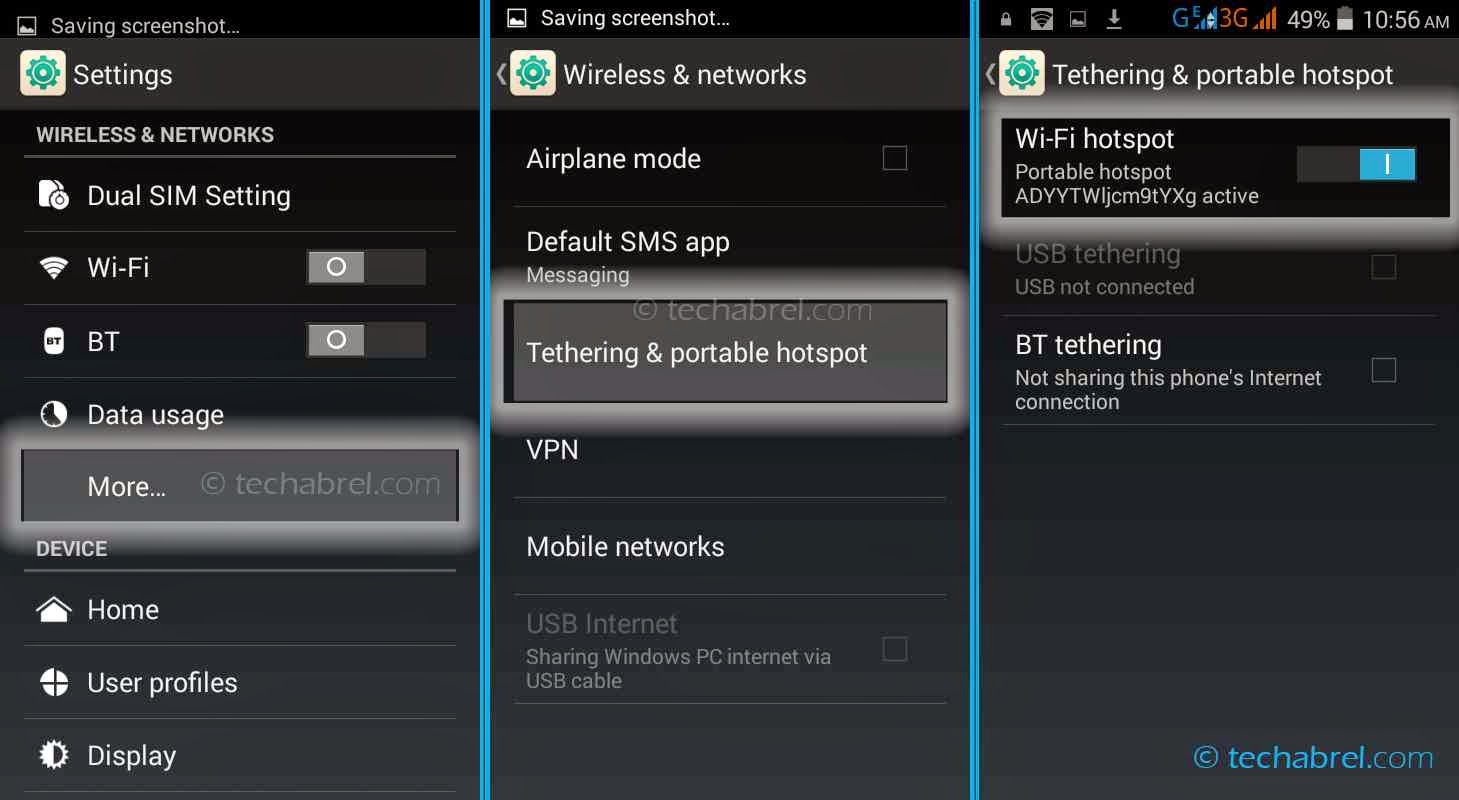
1. First of all go to Settings.
2. Now in the Wireless and Networking section click on More.
3. Next navigate to the option Tethering and portable hotspot.
4. There simply switch on the Wi-Fi hotspot (by sliding the switch).
That’s it. Now you can easily connect your computer or any other device to Internet. To do that just switch on the Wi-Fi on that device. Then it will automatically show down the list of Wi-Fi networks available (including your newly created Wi-Fi hotspot). Just connect to that and you're done.
Customizing The Wi-Fi Name:
If you want to give your Wi-Fi a custom name, at first tap on the Wi-Fi hotspot option (in the Tethering & portable hotspot section). Now press Set up Wi-Fi hotspot. And change the Network SSID to any name you want.
Setting Up A Password:
To set a password to your Wi-Fi hotspot follow the same path as you did while naming your Wi-Fi (i.e. Go to Tethering & portable hotspot > Wi-Fi hotspot > Set up Wi-Fi hotspot). Now below the Network SSID, you should notice a Security option. Found it? Great. By default it remains set to Open. Change it to WPA2 PSK. And soon after you do that, a password field should arise. Erase whatever’s written up there and type down any desired password you want.
Other Settings:
Under the Basic Settings section in Wi-Fi Hotspot, there’s an option named Keep Wi-Fi hotspot on. With this option, you can easily set a time after which the hotspot will shut down. The Bandwidth usage shows how much network is being exploited by the connected device. And you can also limit the data transfer speed by enabling the bandwidth throttling.
Conclusion:
So thus we can use our android smartphone to create a Wi-Fi zone anyplace, anywhere. Go and try it out yourselves. In case you face any difficulties following the steps, just mention it in the comments section. I'll get back to you. And if you found the article helpful, please share it to your buddies (before they do)
Best Regard: Dayur Digt
Note: Users from US may face some difficulties in this procedure, as they might need a working tethering plan. So make sure you have a tethering plan running. Or else search for other Wi-Fi tethering apps in the Playstore which will help you skip the plan requirement.
So How To Do It?
The process will merely take 2-3 minutes. Follow the simple steps below.
1. First of all go to Settings.
2. Now in the Wireless and Networking section click on More.
3. Next navigate to the option Tethering and portable hotspot.
4. There simply switch on the Wi-Fi hotspot (by sliding the switch).
That’s it. Now you can easily connect your computer or any other device to Internet. To do that just switch on the Wi-Fi on that device. Then it will automatically show down the list of Wi-Fi networks available (including your newly created Wi-Fi hotspot). Just connect to that and you're done.
Customizing The Wi-Fi Name:
If you want to give your Wi-Fi a custom name, at first tap on the Wi-Fi hotspot option (in the Tethering & portable hotspot section). Now press Set up Wi-Fi hotspot. And change the Network SSID to any name you want.
Setting Up A Password:
To set a password to your Wi-Fi hotspot follow the same path as you did while naming your Wi-Fi (i.e. Go to Tethering & portable hotspot > Wi-Fi hotspot > Set up Wi-Fi hotspot). Now below the Network SSID, you should notice a Security option. Found it? Great. By default it remains set to Open. Change it to WPA2 PSK. And soon after you do that, a password field should arise. Erase whatever’s written up there and type down any desired password you want.
Other Settings:
Under the Basic Settings section in Wi-Fi Hotspot, there’s an option named Keep Wi-Fi hotspot on. With this option, you can easily set a time after which the hotspot will shut down. The Bandwidth usage shows how much network is being exploited by the connected device. And you can also limit the data transfer speed by enabling the bandwidth throttling.
Conclusion:
So thus we can use our android smartphone to create a Wi-Fi zone anyplace, anywhere. Go and try it out yourselves. In case you face any difficulties following the steps, just mention it in the comments section. I'll get back to you. And if you found the article helpful, please share it to your buddies (before they do)
Best Regard: Dayur Digt
Wednesday, August 5, 2015
How to use your old BBM account on another phone
I passed through this problem months ago when i changed my phone from bb to android.
if you wanna use your old bbm account in a new blackberry device and you find it so difficult Bother not just go to appworld and signup with your blackberry id. Now upgrade your bbm your account will be connected to bbm automatically for abdroid or other device Open your bbm and click on already have an account Now sign in using your email and password you used in your bbm registration!!!!
Hope this post helped?
Oya drop your comment and help us share
How To Add A Recycle Bin In Your Android Phone Or Tablet?
Ever deleted any files mistakenly and wondered, wish you had a recycle bin in your android phone? Well, let’s make your wish come true. Recycle bin is one of the most exciting features of windows PC. In case you don’t know what a recycle bin is, let me tell you. It’s a kind of dust-bin of your computer. Whenever you delete a file, say a video song, it doesn’t permanently vanish from your computer. It still remains in the dust-bin, i.e. in the recycle bin. And later if you change your mind, you can restore (undelete) it easily. Now that’s a cool feature of computers. But what happens when you delete a file in your favorite android device?
There is no recycle bin like computers in android phone or tablet. So when you delete some files, they get erased, forever. Worst thing is when you delete some of your rare, favorite file(s) accidently! That crappy – ‘What-did-I-do’ feeling is very common amongst smartphone users. So what to do? Well, relax, chill down your jaw. We have something awesome for ya. In this article, I’m gonna tell you how to add a recycle bin in your android system which will help you to restore back accidently deleted videos, songs or any other files. So How To Do That? Since that we don’t have that feature in our devices in-built (not even hidden), we can’t really do some magical stuffs and unlock it. Pretty obviously we’re gonna use some third party app. But, there are plenty of apps that can help you to add a bin to your phone. Just search on Playstore with the term - ‘Recycle Bin’ and more than a dozen of apps will appear. So to be sure whether the app works or not, you’ve gotta install them one by one and test. Kind of frustrating, isn’t it? Okay, so let’s automate your job a little bit. After testing few of the apps appearing at the top of the results, I’ve sorted out the best of them. Dumpster. One of the best file restoration apps available on android market. And the most pleasing fact is that it doesn’t really require root permission. So even un-rooted users will be able to utilize this tool. Now let’s have a look at how to setup this app and use it to restore deleted files.
1. At first install the app from playstore, and open it. After opening it, accept the terms and conditions, when prompted.
2. Next, a page willl open asking you to select your desired file types. These are the file types that the app will keep track on, and will be able to restore back when deleted. There are several other options in that page, such as auto-clean, lockscreen etc. You can enable them if you wish. And if your device is rooted you can also switch on the root access (this will help the app work better). After the selection is done, click Next.
3. Your job is done. Now sit back and wait for the accidental deletion or to see whether it works or not you can run a sample test. Simply delete any useless file (should be amongst the file types you chose previously).
4. Now open the Dumpster app. There you’ll notice a list of deleted items. Choose any item and click on it. Then simply press Restore. The file’s now successfully restored to its previous location. You can go to the folder and check whether the file is there or not.
So that’s how you can easily add a recycle bin feature in your android device using a simple third party app. Besides Dumpster, there are several other amazing apps, try them out and tell us which one works best for you. And if you face any problem restoring your files, you can comment below, we’ll reply you as soon as possible. Till then, goodbye.
How To Get Traffic On Your Blog Using Socialmarker
Traffic has been one major problem of bloggers these
days. Some rely on organic traffic while some goto any extent to get traffic.
Today I will be sharing with you a video tutorial on how to drive thousands of traffic to your blog daily with socialmarker.
Social marker is a tool that les you ping you site to so
many sites.
You can watch the video above
or you click here to download the video
NOTE: socialmarker is not a bot tool so it won’t affect your blog or your adsense
Subscribe to:
Posts (Atom)